If you want to know how your film gets shown in a theater, first it needs to be in DCP format. So let's start with what DCP actually is.
DCP stands for Digital Cinema Package — it's a digital cinema data package used for theatrical playback. DCP packaging follows strict standards — any error in the process can prevent the film from playing on a projector. That's why DCP mastering requires meticulous, experienced professionals with solid knowledge of the film workflow and a strong theoretical understanding of film and video assets.
Now let's break down the components of a DCP. LI TRUST specializes in professional DCP mastering, DCP subtitle burn-in, and DCP-to-digital conversion. Below, we use a DCP we previously produced to illustrate the role of each file in the package:
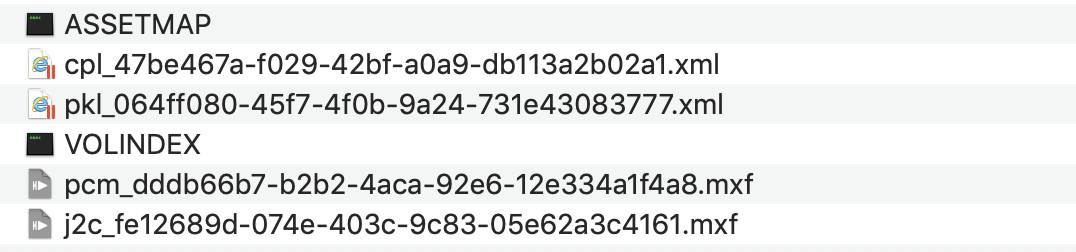
1. Assetmap — the asset mapping file that describes the location of every asset within the DCP. Think of it as a file index that tells the projector where each file lives.
2. Composition Playlist (CPL) — the composition playlist that defines the playback order and timing of all assets. The film's screening is initiated by this file.
3. Key Delivery Message (KDM) — the key delivery message that transmits decryption keys. It contains three types of information: the content decryption key; key parameters, primarily the key's time window (validity period), i.e., the film's release window; and the Trusted Device List (TDL), which lists authorized devices. Structurally, a KDM has three parts: Public, Private, and Signature. KDM files are typically downloaded by theaters from the official websites of distributors like China Film Group or Huaxia Film, or delivered by the cinema chain to its theaters via network or satellite.
4. Package List (PKL) — the packing list that specifies which assets are included in the DCP and provides the hash value for each file to verify asset integrity and confirm no files are corrupted.
5. VOLINDEX — the volume index file that identifies the current hard drive number, used for cross-disk playback control. Very long films may be stored across multiple hard drives.
6. PCM files — the audio track files for the film.
7. J2C files — the video track files for the film.
Among these, the assetmap and VOLINDEX files are plain text files with no extension. CPL, PKL, and subtitle files are XML-format files. Both types can be opened with an XML editor, Notepad, or Internet Explorer. Audio track files, video track files, and their corresponding subtitle package files are all MXF files.
That covers the file structure inside a DCP package.
Additionally, if there are external subtitle or dubbed audio files, the VF (Version File) package consists of XML + font files. For dubbed versions, these come as VF audio packages.
If you're not familiar with DCP, we strongly recommend working with professionals. A DCP created by non-specialists or inexperienced teams can lead to all sorts of issues in theaters — playback failure, audio noise, insufficient brightness, frame stuttering, and more.